jQuery UK – Morning Sessions

Last week I was lucky enough to attend jQuery UK, a conference focussed around front-end web development, the technology and tools behind it. Despite the title, jQuery UK isn’t focussed exclusively on jQuery. This year’s keynote speech from Mark Otto was specifically about CSS, and a couple of talks discussed practices which avoid using even JavaScript.

The conference mostly took place across two streams, which means I can only report on around half of the content based on the sessions I attended. I specifically tried to attend talks that could be relevant to the work we do in Apps, and so missed out on topics like game development and WebGL. When the videos for the remaining talks are uploaded I’ll scan through them as well and write a follow-up post.

I’ve split my talk descriptions into two posts: morning and afternoon. I should also note that I’m providing this write-up from the point of view of IS Apps, so some stories might not be as relevant to you as others. I’ve provided a tl;dr with each talk which will hopefully help suggest which you might want to read more details on.

Edit (24th March): Updated each talk with its video and slides where possible.

Continue reading “jQuery UK – Morning Sessions”

IT Futures – Morals, ethics, surveillance, security

The IT Futures conference raised a number of issues around data, who should be responsible for its safety and what can and/or should be collected. While most of the conference was talking about interesting pieces of research and investigation, a few bits were of relevance to SSP.

The ethics of detail analysis

There are a number of measures in place for making use of student data, for example identifying when a student is experiencing difficulties before an assessment. An early warning system of sorts. However, there are certain data that could be gathered for this which are not. IP address for location of log in, or cause of an absence are two such examples not collected.

The data that SSP uses revolves mainly around student data, so a lot of what has been discussed focused on how this can and should be used. The fact that the access to said data is prevalent in the team means that decisions have to be made on what will and will not be used.

Who is responsibility is it that your data is safe?

It was said in the conference that the University has experienced 12 moderate to severe data security incidents. The key-logger found back in November was one such incident, though it was broken into very easily as whoever used it forgot to change the default password. Universities do not like admitting vulnerabilities, though it was found that three other Institutions, including Birmingham, found key loggers. So this is not an isolated incident among Universities.

The location of data becomes very important for security reasons. The University has an agreement with Microsoft to use OneDrive for storing data ‘safely’. This then puts the responsibility of securely storing that data on Microsoft.

Thinking about where data is secured, either locally or off site with a contracted third party, it pays to think about how the data is secured.

On a side note, it was mentioned that Office 365 has an ability to remotely wipe devices. This can lead to unfortunate situations where a device could be wiped remotely when it shouldn’t be!


From the sublime to the ridiculous: Development tools in Dev Services

As a ColdFusion developer, my own journey to finding the perfect development environment has been, I suspect, fairly typical. I cut my teeth with Dreamweaver. I progressed to ColdFusion Builder 1, then 2. I toyed with Notepad++. I gave Eclipse a whirl. Most recently, I’ve been developing almost exclusively in Sublime Text 2.

I feel that my switch to Sublime Text has increased my productivity, so naturally I was curious about what others in the team were using, and whether it would be worthwhile purchasing licenses for the team(s). To find out more, I asked colleagues within Development Services to participate in a survey about their development environment preferences.

21 people were kind enough to take the time to respond, here’s what I found:

Q1. What languages do you work with?

Question 1: What languages do you work with?

With skills across a range of software platforms, we’re not a one-tech-shop, so to get some context I had to ask respondents about what languages they were developing in.

It was interesting to note that we have more developers using Java than ColdFusion, despite ColdFusion being our primary development platform.In hindsight, perhaps I should have framed the question to include a weighting on time spent on each language.

There were no surprises that SQL is ubiquitous and JavaScript usage is widespread.

The 3 “Other” responses were: Bash, Unix shell scripting and C#.

Q2. How do you run your local development?

Question 2: How do you run your local development?

I thought that whilst I had people completing the survey, I might as well try to find out some additional things about how they worked, like their approach to local development.

The ‘Other’ response was:

for SITS we have to develop on the client but use a lot of local development sometimes with VMs etc

I was surprised by the number of respondents who use locally installed server software, personally I have found the use of virtual  machines to have huge advantages in simulating infrastructure, and assisting collaboration within projects.

From the two main virtualisation options, VMWare player has the edge over VirtualBox.

Q3. What do you currently use as your primary development tool?

Question 3: What do you currently use as your primary development tool?

This is the question I was really interested in: What IDEs or editors are being used for development?

Unfortunately I only allowed respondents to choose one answer. Some obviously couldn’t decide and so choose ‘Something else’ and put multiple tools:

  • Spring Tool Suite/Eclipse/Webstorm
  • I switch pretty evenly between eclipse & netbeans
  • PSPad
  • SQL Developer
  • Oracle Developer but also use Notepad++
  • SublimeText (evaluation period), ColdFusion Builder 2, NetBeans
  • PHP Storm and Notepad+

It looks like Sublime Text has the edge, with Eclipse and NetBeans coming in close second.

Q4. How do you feel about the IDE/editor you chose?

Question 4: How do you feel about the IDE/editor you chose?

I asked this question because I wanted to know if people are satisfied with what they’re using.

The results show that people seem mostly satisfied. Some respondents gave detailed feedback:

I’m pretty happy with both eclipse & netbeans, although both have their niggles. I don’t think there’s such a thing as the perfect IDE. At 7 below, I say I’d consider switching to SublimeText, but I’d need to evaluate it as I have never used it. I’m not sure how well it would work for Java development, and there is an eclipse plugin for Drupal development I use which I don’t think would be there for SublimeText.  [Answered ‘eclipse and netbeans’ in Q3]

It has lots of niggles and there is not a better alternative available in the University, there are better ones available though. [Answered ‘Oracle Developer but also use Notepad++’ in Q3]

CFBuilder does the IDE job, LOVE SublimeText does it all (or most of it – CF), Love NetBeans (Java), Like Eclipse (Java) [Answered ‘SublimeText (evaluation period), ColdFusion Builder 2, NetBeans‘ in Q3]

I don’t really like it, but haven’t made the effort to sort out a different one… [Answered ‘Eclipse‘ in Q3]

Q5. What features do you use?

Question 5: If you use an IDE, what features do you use?

I wanted to know more about what features our developers were looking for in their choice of IDE/editor.

The results show that only around half of the respondents use the features that IDEs provide, the other half are only using it as an editor, or not using an IDE at all.

I wondered why some people are finding value in the IDE features, and some are not. Perhaps there is a link with development platform? I correlated the results with the development platform data from Q1:

Correlation between development platform and usage of IDE features.

This shows that:

  • All but two of the Java developers use multiple IDE features.
  • No ColdFusion or PHP web application developers use IDE features unless they also develop in Java.
  • The developers working on 3rd party applications do not use IDE features except for one respondent who uses line debugging..

My own experience of using these IDE features within a ColdFusion / ColdFusion Builder context has been largely frustrating. Line debugging in particular would be a useful troubleshooting technique, but configuring it to work with my local development environment (i.e. ColdFusion running in VMs) is enormously difficult and can turn into a huge timesink. This is an area where collaboration may be useful to find some kind of solution that is workable.

Q6. Would you like a Sublime Text license?

Question 6: Would you consider switching to Sublime Text if a license was purchased?

Sublime Text is not a free product. Would more developers use it if the University provided licenses?

The results suggest that three quarters of those surveyed would be interested in getting a license for this product.

Summary

People are using a wide variety of tools to support development.

Most ColdFusion developers only require editor features, whereas most Java developers use multiple IDE features.

Many developers would like to use Sublime Text if we had a license for it.

I was not surprised at the positive response to Sublime Text. Personally I have found that it offers many features, such as multi-line editing, which are a huge boost to productivity,

Thanks to all who participated in the survey, I feel that the results demonstrate that there is a strong case for offering Sublime Text licenses for those who would find it useful.

UCISA CISG 2014

I’m attending the UCISA CISG 2014 conference.  As this is not specifically about development, I’m using my own blog to post about the presentations (with some delay, as I’m not one of these people who can write a blog post during the presentation itself!).

UCISA is the University and Colleges Information Systems Association, which brings together IT people from across the UK Higher Education sector. CISG is their Corporate Information Systems Group, who run a conference every year.

SITS User Conference 2014

This past summer, representatives from the SSP team attended the annual SITS user conference. (Yes, it has taken this long for us to type up our notes.)

Ruth McCallum and Peter Pratt represented the team in giving a presentation called “Taking e:Vision to a new frontier”. This demonstrated some of the recent work we have done using Bootstrap and other custom CSS/JS. Following the presentation we have been in contact with several other universities who are interested in sharing techniques with us, and hope to keep in contact with them. We were also recognised for our achievements by winning the Tribal University of the Year award for 2014!

University of the Year award
Team manager Defeng Ma proudly displays our University of the Year award

Overall, the conference focused on some of the new functionality and improvements which we will be seeing in SITS 8.7.1 and 8.8.0. Below are some highlights from the sessions that we attended.

Continue reading “SITS User Conference 2014”

SSP New Developments

The Student Systems Partnership (SSP) Team has recently developed and successfully applied to live the following three projects:

SAC018 UKBA Data Recording – Overseas students can study in the UK after being granted a visa under Tier 4 of the Home Office (formally the UK Border Agency) points based system. This main aim of this project was to improve the way University holds data for Tier 4 students by bringing information from disparate systems into EUCLID to allow effective reporting on, and monitoring of Tier 4 students.

Other improvements were made so that CAS (Confirmation of Acceptance of Studies) requests for students extending their studies are generated in EUCLD rather than keyed manually. Tier 4 data is now presented in one place within EUCLID for review by Registry staff at Census points. Copies of passport and visa documents can be stored and accessed from EUCLID.

The software has been successfully used during the last week (20th – 24th October) the Tier Four Census 2014-2015 academic session. The census details of around 5,500 students were collected and stored within the SITS database.

SAC019 Direct Admissions Review – The purpose of the project was to review Direct Admissions Processes across the university with a particular focus on PG and VS applicants looking at the process from the decision to submit an application to the point of decision. The new Direct Admissions application uses the same framework as the one developed as a part of the first SSP Agile project Paperless Admissions. From the technical side the following technologies or improvements have been added to the SITS:

PD4ML – is a powerful PDF generating tool that uses HTML and CSS (Cascading Style Sheets) as page layout and content definition format. The software has been installed on the SITS server and is used to generate the PDF version of the offer letter so it can be printed on the student request. The technology has been also successfully used in the Student Self Service to print documents such as Certificate of Matriculation, Higher Education Achievement Report (HEAR), Certificate of Student Status (for Council Tax Exemption)

E: Vision SSO Single Sign On enhancement – a MD5 encryption method of the single sign on links has been replaced with more secure AES Advanced Encryption Standard (32 character key)

SAC033 Tier 4 Engagement Monitoring – The aim of this project was to meet the requirement by UKVI to be able to report on engagement for all Tier 4 Students by September 2014. As a part of this project the following functionality have been delivered:

  • Exposure of engagement points from other sources within EUCLID
  • Bulk creation of engagement points within EUCLID
  • Auto-scheduling of engagement points per student within EUCLID
  • Facility for administrators / academics to record engagements within EUCLID
  • Upload of engagement points from spreadsheets into EUCLID from an external source

From the technological point of view the following solutions have been used:

  • Creation of the JSON object from the .csv file
  • Validation of the JSON objects using the JSON schema http://json-schema.org/
  • Creation of csv files from the html tables

Testing Times – Python unittest and Selenium

In the SSP we have been putting together a small suite of performance tests to use as before/after checks in the SITS upgrade. In the SSP we have a mixture of IS and non-IS staff, so it was important to come up with a procedure which was:

  1. Easily maintainable
  2. Accessible to team members who don’t come from a programming background

Selenium was a natural choice, since it is already being used elsewhere in the department, and it has a handy interface which lets you record tests easily.

Continue reading “Testing Times – Python unittest and Selenium”

IS at DrupalCon Amsterdam – Day 3

This is the third in a short series of posts from DrupalCon 2014 in Amsterdam, where a few members of IS are spending this week. On Wednesday and Thursday I posted some session summaries from Day 1 and Day 2 of DrupalCon.

Yesterday was the final day of conference sessions and after the main auditorium session of Drupal Lightning Talks, the Drupal Coder vs Themer Smackdown perfectly illustrated one of the best things about DrupalCon, the element of fun that can pervade even the driest, most technical discussion.  The Smackdown was neither dry nor immensely technical, but Campbell Veretsi and Adam Juran managed to make some serious points about good Drupal development practices whilst wearing martial arts gear and waving weaponry around.  Watching their antics was a great way to wake up for a day of DrupalCon talks, and their battle to create a Drupal site from wireframes using either only code or only the theme in only 15 minutes showed how Coders and Themers are inherently dependent on each other and are better off hugging than fighting.

Our experiences of some of Thursday’s sessions are outlined below. Two sessions from Day 2 which were not written up in time to appear in yesterday’s post are included here. Once again, thanks to Aileen, Arthur, Riky, Tim, Andrew, Adrian and Stratos for contributing their thoughts on sessions they attended; any errors, omissions or misinterpretations in their edited summaries are entirely mine. Most of the sessions mentioned below, along with many more interesting talks, are recorded and available on the DrupalCon website, so if the summaries pique your interest, visit the DrupalCon site for more information!

Development Processes, Deployment and Infrastructure

How we Quantified the True Business Value of DevOps with Real-life Analysis

This talk did an excellent job of not only giving the general benefits of DevOps, but why it is good for the Business too. It focused on six phases for implementing DevOps, saying that it’s not about whether you are using DevOps or not, but more a case of how much.

  • Create your world – Use deployment and configuration management, and standardise across the board.
  • Monitor your world – Use effective automated monitoring with easy access to information and a clear notification and reaction process. This is not using grep in /var/log/; see the session on logging and monitoring tools.
  • Improve your world – Minimise repetition so that you can maximise the time spent on actual issues rather than environmental problems. Nobody should be logging onto servers.
  • Test your world – Use automated testing (you shouldn’t need to depend on a developer triggering them) with robust test strategies; this makes customers happy. We can start small, as any test is better than none.
  • Scale your world – Have automated responses to increased needs, with predictability, reliability and graceful degradation.
  • Secure your world – Use proactive and reactive strategies with intrusion detection and alerts.

We would need to build institutional confidence in our process and what we’re doing, but we can start small. This is firstly a culture change and then a process change, but without Business buy-in, the task is complicated and often doomed to failure. The biggest initial wins can be found with configuration management (Puppet), automated deployment (Bamboo, which we’re already using) and easy scaling (OpenStack, or perhaps AWS). By using a quantification framework we can evaluate the benefits in using DevOps processes, though they are not all immediately quantifiable; it’s best to start with easy, universally understood metrics.

Of all the sessions I have seen, this is a true must-watch for anyone that doubts DevOps is the future and contained so much useful information that my summary has barely scratched the surface. Watch it during your lunch; you can thank me afterwards.

GitHub Pull Request Builder for Drupal

Note that this session happened on DrupalCon Day 2.

This session described how Lullabot use GutHub pull requests to automatically build a Drupal instance to test changes.

The pull request includes the Jira ticket number and allows you to see review a list of all commits much as Bamboo currently does for us, but you also get a diff of the changes across the request.

For their automated deployment Lullabot use Jenkins, which listens out for pull requests to the development branch rather than commits. It then builds a dev environment from the dev branch, including the pull request patch, and when done posts a comment in the pull request with a link to the testing environment. The comment includes instructions for clearing down the test area when finished. This is achieved using a Jenkins plugin listening to an IRC channel; a message of “jdel 12345” will delete the test environment for pull request 12345.

When building the test environment, a recent copy of the live database is used so they can test against real data.

If there are any changes required and more commits are pushed to the pull request, Jenkins rebuilds the test environment and re-runs tests. Lullabot have found this very useful as it lets clients quickly see new features or enhancements without affecting other environments, especially where multiple features are being developed in parallel; each feature has its own test environment derived from that feature branch’s pull request.

Once the pull request is merged you can automatically deploy to another environment.  Alternatively, this can be left as a manual job and multiple pull requests included to build a release.

As part of this automated deployment process, Lullabot run automated tests using CasperJS and take screenshots with Resemble.js; the process then sends out a login link for testing using an admin user which exists purely within that test environment.

Lullabot are currently working on a service which supports this automated build of Drupal environments. Currently in private beta, it can be found at http://tugboat.qa/.

Automated Performance Tracking

We should be considering how to measure performance better, not just in terms of which metrics to gather, but making sure that the measurements we do take are repeatable and relevant. This talk was mostly about trying to get the “core introspection” methods more widely used and extended since what is currently available is not very useful at the moment, which may not seem immediately relevant to the University, but there were some interesting points.

For instance, performance measuring should be a part of the project from the beginning. We need to see how performance changes over time – the best case would be over every commit. This would allow to evaluate changes in terms of performance – “Yes, sure you can have that feature but it will make your site run 10% slower”.

There are many different technical challenges with measuring performance.

  • Which metrics to take? Different sets will be useful for front end, back end, databases, and external services.
  • Which tools set to use? XHProf and webprofiler are the current most useful and can be used to collect data automatically via XHProf-Kit.
  • How do we automatically setup relevant “scenarios”? This could actually be the easiest task for us. We could import data from LIVE to Staging and then use Behat to run tests for all the user stories. We could even run them in parallel for realistic load testing.
  • Data MUST be collected over time to allow decisions to be made. The smaller the granularity the better, in general.

There are many tools available to help with databases, for example MySQLTuner.pl was mentioned. These could be used as part of the regular support upkeep. The data collected can then be fed back into both the decision making process and the development process.

Also we should keep the slow query log and use tools like pt-query-digest to make sure that things are not getting worse! The sooner we find a problem the better chance we have of figuring out what has caused it and therefore fixing it.

In order to keep the measurement relevant we need to make sure that the different environments are equivalent and that all infrastructure is identical; this is a common theme across many DrupalCon sessions this year.

Another problem with keeping the performance relevant is how to ensure that the performance is NOT measured on sites on virtual machines. The speaker discovered that the differences between runs was too great to make the measurements useful; in order to make these measurements comparable, they should be done on dedicated machines, not virtual ones. This could create problems when ensuring that the infrastructure is identical if we rely too heavily on methods that only work with VMs.

At least 6 stats need to be kept for each metric over many runs:

  1. Minimum value
  2. Maximum value
  3. Average
  4. Median
  5. 95 percentile
  6. 5 percentile

This is the only way to even out many of the non-code contributors to performance.

The new sensiolabs profiler was mentioned. In is currently in private beta but will be very fully featured. We’ll probably need to wait and see. It will be free to OSS projects so it will be easy to evaluate.

Building Modern Web Applications with Ember.js and Headless Drupal

Ember.js is a client-side javascript framework for building single-page applications using the MVC architectural pattern.  The presence of this session and similar sessions at this year’s DrupalCon reflects the fact that single-page applications are becoming the norm. For speaker Mikkel Høgh, this development is inevitable as the expectations of web users increase.  Constant page reloads are not efficient; it’s not just the request/response overhead that are an issue, but the repeated re-rendering of page content, CSS, etc. Ajax calls can help with this, but building an entire application using javascript, jQuery and ajax without a framework does not make for clean, maintainable code.  Ember.js, like Angular and Backbone, is a framework designed to address these issues, with a rich object model and automatically updating templates using Handlebars, a semantic templating tool similar to Twig.

This session outlined the main core of Ember.js, a full-stack MVC framework in the browser and demonstrated some key features such as:

  • adherence to the concept of “convention over configuration”, which means there is less boilerplate code and more auto-loading;
  • “ember-flavoured” Web Components, an intermediary measure designed to alleviate poor browser support for the Web Components standard, which is not yet complete;
  • the class-like Object Model, based on Ember.Object, which supports inheritance;
  • two-way bindings that allow templates to automatically update with data regardless of where the model is updated;
  • automatically updating ‘computed properties’;
  • the importance of Getters and Setters, which must be used to allow the appropriate events to fire and update all uses of the data;
  • Routing, which determines the structure of the web application by specifying the handlers for each URL;
  • naming conventions, the use of which allows the framework to make reasonable assumptions about what an application needs so that it is not necessary to define absolutely everything;
  • the Controller, Model and View in Ember.js;
  • the ability to rollback data changes in the model that are not saved, allowing for less messy handling of persistent state in the browser;
  • the ability to omit an explicit View implementation because Ember.js can make assumptions based on other application configuration to send a default view;
  • Ember-Data, the data-storage abstraction layer designed to simplify data management over a REST API using JSON
  • useful tools for working with Ember.js such as EMBER-CLI.

The primary focus of the session was Ember.js itself, but the session did turn to the question of why to use Drupal as a back-end for an Ember.js application.  The benefits raised were very similar to those mentioned in other DrupalCon talks on headless Drupal, such as:

  • authentication, permissions and user management;
  • an easy Admin UI
  • the availability of many modules to provide rich functionality, enabling the Ember.js application developer to focus on the core application.

It was really interesting to hear about an increasingly common approach to addressing the challenges faced by modern web developers. Single-page applications are not an area we have widely explored, but given their prevalence and the increasing richness of the javascript frameworks available, it’s important to have some awareness of this web development technique and this session certainly provided much food for thought.  In the context of the University’s new central Drupal CMS, headless Drupal is not something we intend to explore; however, it seems likely that there will in future be local headless Drupal installations in Schools and Units that receive feeds from the central CMS.

If you’re interested in reading more about ember.js, see these pages:

Front End Concerns

Integration of ElasticSearch in Drupal – the “New School” Search Engine

This session included a presentation and demo on ElasticSearch, a full-text search server and analytics engine based on Lucene with a REST-ful web interface and features also available through JSON API.  Several Drupal modules were mentioned that have been written to make ElasticSearch available in a Drupal site.

Some key points:

  • easy to install and configure with an easy-to-use interface;
  • very scalable and distributed in a configurable way;
  • replication is handled automatically;
  • it is all open source and since the main application is comparable to a database the hosting needs will be similar;
  • the system contains a method which allows for conflict resolution if multiple users enter the same document to different nodes;
  • the query system is more powerful and flexible than other “URL only” systems for creating the queries;
  • it can be used with many other modules including watchdog and views;
  • it can be used with an ElasticSearch views module to allow querying of indexes of documents that are not in Drupal.

Sites developed by WIT for other areas of the University currently use Solr where more powerful search features are required.  Following this session, they intend to try out a cloud-hosted elastic search service, http://www.found.no, with one of their sites that currently use Solr.  This will allow comparison between ElasticSearch and Solr to determine whether it is a suitable alternative.  From the perspective of the University’s central website, it will certainly be interesting to explore further the details and understand how ElasticSearch could be useful. Watch this space!

Project Management and Best Practices

Drupal Lightning Talks

Thursday began with a series of short talks on various technical and non-technical topics.  Some, like the Coin Tools Lightning Talk, were technically of interest but not necessarily directly related to our own use of Drupal.

The Unforseen: A Healthy Attitude To Risk on Web Projects

Steve Parks talked about how management of Risk can be a major blocker in projects being successful, highlighting the need to accept that there is risk associated with any project and the fact that trust is of great importance in mitigating the impact of risk.

Druphpet

The talk on the Druphpet project and Puphpet showcased a Puppet-based Vagrant VM suitable for instant and unified configuration of Drupal environment.  The question of how to get a fresh, consistent local development environment running as quickly as possible for the University’s new central Drupal CMS is something that we are currently exploring.  Puphpet is certainly something we will look into!

Continuous Delivery as the Agile Successor

Michael Godeck’s talk was of particular interest given the adoption within IS of automated deployment tools to support our internal Agile methodology.  The subject is closely related to DrupalCon sessions on DevOps with common underlying principles such as the importance of communication across teams and shared ownership.

Godeck talked about how Agile was effective in changing software development because it has “just the right balance of abstraction and detail to take the software industry to a new plateau”. Improvements in quality & productivity are gained by using Agile tools seriously.  Agile was designed to address difficulties in responding appropriately to changing requirements throughout the project life-cycle.  It is successful in that regard, but the key is to be able to *deliver* the software.

Continuous Delivery practice has the goal of dealing with the delivery question in the way that Agile has dealt with management of risk.  The emphasis is on resolving the conflict between the need to deliver quickly and get fast feedback and the need to run complex test suites which can be slow.  Build Pipelines break the build up into stages, with the early stages allowing for quick feedback where it is most important, whilst the later build phases give time to probe and explore issues in more detail. Like Agile, Continuous Delivery only provides the best benefits by changing culture across both technical and non-technical teams.  The key point is that software delivery should not be a “technical silo”; it belongs to the whole team and with Continuous Delivery, the decision to deliver software becomes a business decision, not a technical one.

We are already using many of the techniques and building blocks that are part of Continuous Delivery. However, the principles of Continuous Delivery are worth exploring further to identify where we may streamline and improve our existing practices.

Lightning Talks 2

This session was a follow-up from the main auditorium Lightning Talks earlier in the day.  It comprised two separate short presentations.

Session 1: AbleOrganizer: Fundraising, Outreach and Activism in Drupal

In this talk Dr. Taher Ali (Assistant Professor of Computer Science/ IT director of Gulf University for Science & Technology (GUST)), presented on the challenges around convincing senior management to adopt Open Source applications. One of the major concerns was around the support and maintainance of Open Source solutions. However after presenting a convincing argument built around the community strengths and license costs, the University now run the majority of their systems using open source applications.

One of the main advantages that the University has found is the ease of integration of Open Source application with one another.

Lightning2

Finally, it was noted that by becoming a gold sponsor of this event was their way of feeding back into the community.

Session 2: eCommerce Usability – The small stuff that combined makes a big difference

Myles Davidson, CEO of iKOS, gave a rapid fire presentation of how small subtle changes can collectively make a huge difference to customers and their success.

Some examples are listed below.

  • When using forms – make things simple, don’t make your users think!
  • Know what your users want and develop the front end towards their needs.
  • Make it clear – don’t drive people away though ambiguous messages. Use help text to help not hinder.
  • Where possible use defaults – reduce double keying e.g. Deliver and invoice addresses.
  • Be careful with buttons – don’t break the user journey.
  • Search – do it properly, do it brilliantly or leave it alone. People will leave your site if search doesn’t work.
  • Site recommendations need to be realistic.
  • Analytics – the key is that you can’t manage things that you don’t measure and you can manage everything!

12 Best Practices from Wunderkraut

Note that this session happened on DrupalCon Day 2.

At last year’s DrupalCon I saw a presentation from Wunderroot which saw 45, yes 45, different presenters in 60 minutes. This year they have reduced that down to a mere 12. Each presenter covered a single best practice compressed into 5 minutes and not a second was wasted. There were actually only 11 but let’s not be pedantic.

  1. Risk – adopt a healthy attitude to risk. Trust, training and responsible planning are better than bureaucratic rules  to manage risk.
  2. Predicting the future – Impact Mapping in four words Why, who, how and what. More info on www.impactmapping.org
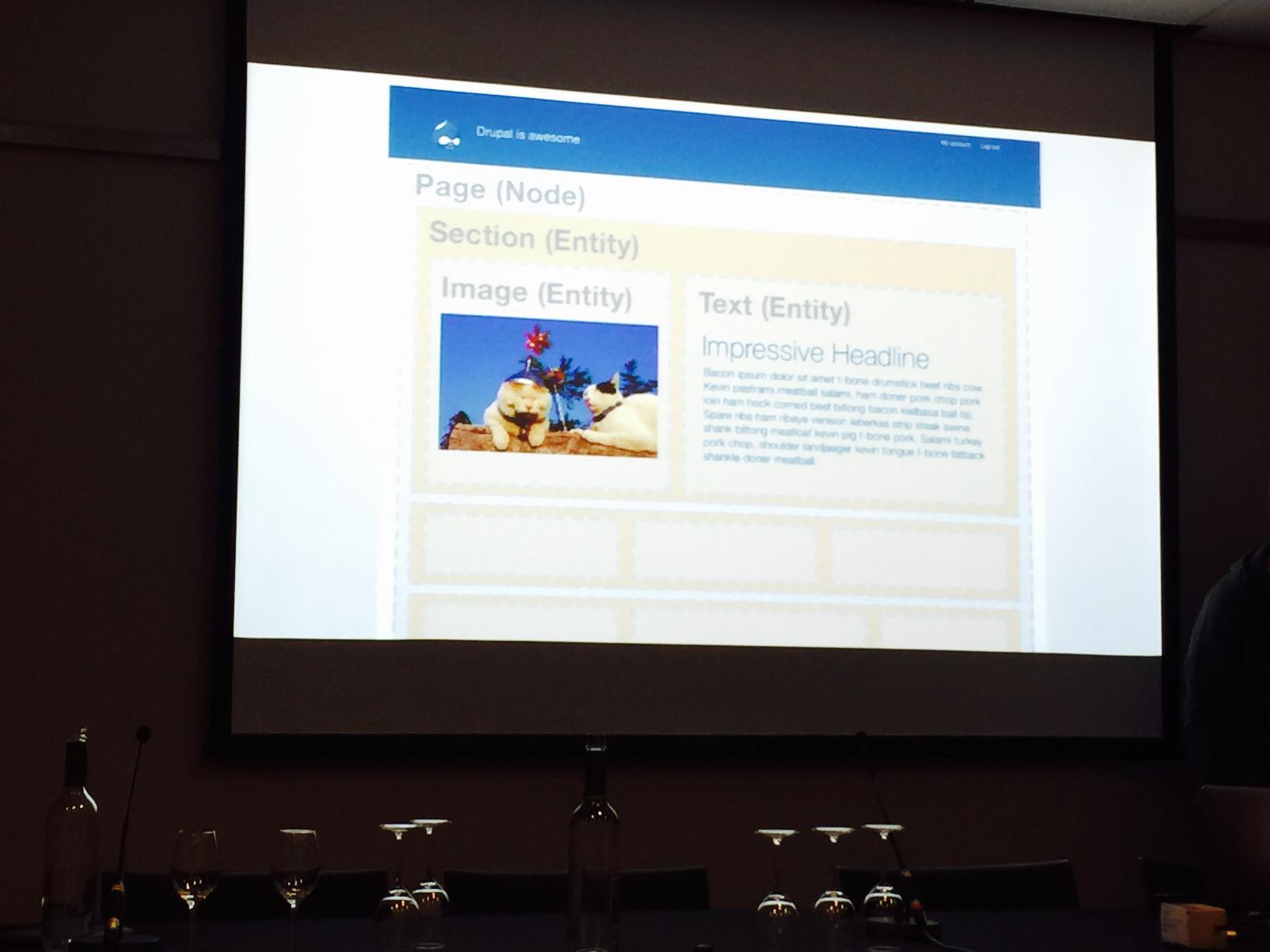
  3. Custom Webpage Layouts – put everything on one page!12BestPractices1
  4. How to make complex things simple – your website should mirror your customers needs not your company! Keep content consistent and the user experience consistent.
  5. Balance theory and practice – using new tools is not only about technologies it is also about approaches.
  6. Managing Expectations – 70% of projects fail due to communication. Keep communicating the minor decisions and use the project steering group to align expectations with stakeholders. Transparency is king!
  7. If you can’t install it, it’s broken – make sure the workflows work and keep the configuration in code, and remove old code. Old code smells.
  8. Alignment – let customers come to the community. The community is a rich vibrant and colorful community, there’s no danger in encouraging your customer to become a part of the community.
  9. Learning an alien language in two years – structure the information and use technology, like Anki which uses space recognition. Remember it is a step by step process that takes some time – read, listen and talk to people.
  10. One size fits all – consider all the possibilities. Start with the smaller screens and prioritise the content. Content prioritisation requires good customer knowledge. After prioritisation the content can be re-engineered for the specific user journey. Lastly, this knowledge can be used to create a road map for content development.
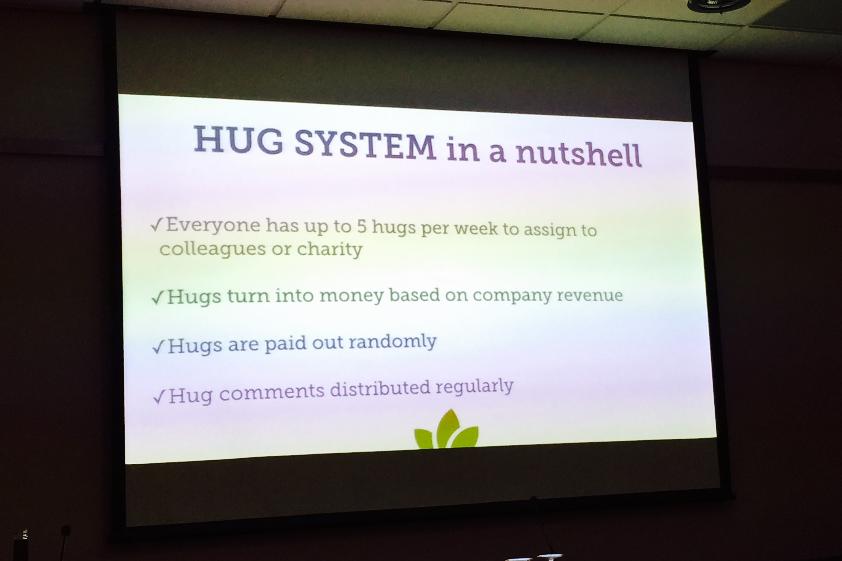
  11. A different kind of bonus system – hugs equal money.12BestPractices2

Hardcore Drupal 8

Field API is Dead, Long Live Entity Field API!

With the beta release of Drupal 8 there are major changes to the API and Field API is no exception. This session outlined key aspects of Entity Field API in Drupal 8, some of which are summarised below.

The Entity Field API unifies the following APIs/features:

  • Field translation
  • Field access
  • Constraints/validation
  • REST
  • Widgets/formatters
  • In-place editing
  • EntityQuery
  • Field cache/Entity cache

Many field types are now included in core, removing the need to enable separate modules: for example, email, link, phone, date and datetime, and, best of all, entity reference are now in core. Entity reference being in core allows for some very neat chaining of entities:

$node->field_ref->entity->field_foo;

And you can get a taxonomy term with:

$node->tags->entity;

All text fields now support in-place editing out of the box too, without the need for additional modules. Even in-place editing of the title is now possible.

Since fields can be attached to block entities in Drupal 8, fieldable blocks are now provided out of the box.

We also get “Form modes” in Drupal 8, which are similar to view modes where you can change the order and visibility of an entity type’s fields for multiple forms. In Drupal 7 you only have one add/edit form available, which leads to nasty workarounds for entities such as those required to provide different user edit and user registration forms for the user entity. “Form modes” also makes it much easier to have alternate create and edit forms and to hide fields in forms, especially using the Field Overview UI which works along the same lines as the existing view modes UI.

Comment is now a field, which means you can have comments on any entity type.

In Drupal 8, everything is now an entity. There are two types of entity: configuration entities and content entities. Content entities are revisionable, translatable and fieldable. Configuration entities are stored to configuration management, cannot have fields attached and include things like node types, views, image styles and fields themselves. Yes, fields are entities!

Entities now have the full CRUD capability in core. They are classed objects making full use of interfaces and methods rather than having wrapper functions as in Drupal 7.

The following code example shows how nodes are now handled:
$node = Node::create(array(
'type' => 'page',
'title' => 'Example',
));
$node->save();
$id = $node->id();
$node = Node::load($id);
$node->delete();

A newly created node has to be saved before it exists in the database.

Interfaces are now used to extend a base entity interface when creating custom entities:
$node implements EntityInterface
$node implements NodeInterface
NodeInterface extends EntityInterface

This means you have common methods across all entities:
$entity->label();
$entity->id();
$entity->bundle();
$entity->url();
$entity->toArray();
$entity->validate();
if (!$entity->access('view')) {
// ...
}

Having validation as a method in Drupal 8 separates it from form submission and also allows easier validation through REST APIs.

You can have specialised methods for specific entity types:
$node = Node::load($id);
if (!$node->isPublished()) {
$node->setTitle('published');
$node->setPublished(TRUE);
$node->save();
}

There is built in translation support in Drupal 8, which allows the translated output of all fields on an entity to be handled much more easily than is currently possible:
$translation = $node->getTranslation('de'); $translation instanceof NodeInterface;
$translation->getTitle();
$translation->language()->id == 'de';
$entity = $translation->getUntranslated();

In Drupal 8, $node->body[LANGUAGE_NONE][0]['value']; becomes $node->body->value;. Much neater!

For multiple instances of a field, you can specify the delta with $node->body->get(0)->value or $node->body[0]->value

There is a cheat sheet for the new Entity Field API, available at http://wizzlern.nl/drupal/drupal-8-entity-cheat-sheet.

All in all, these example demonstrate how changes to the Entity Field API in Drupal 8 will make for much cleaner, more readable, and more maintainable code.
IS at DrupalCon Amsterdam – Day 2

Yesterday I posted some session summaries from the first full day of DrupalCon 2014 in Amsterdam, where a few members of IS are spending this week. DrupalCon Day 2 began on Wednesday with a Keynote from Cory Doctorow, a thought-provoking talk on freedom and the internet, a subject about which some of us had previously heard him give at the IT Futures Conference in 2013, and one which has significance well beyond the context of Drupal for anyone who uses the web. The broader relevance of Cory’s speech is reflected in many of the sessions here at DrupalCon; topics such as automated testing or developments in HTML and CSS are of interest to any web developer, not just those of us who work with Drupal.  In particular, the very strong DevOps strand at this conference contains much that we can learn from and apply to all areas of our work, not just Drupal, whether we are developing new tools or managing services.

Our experiences of some of Wednesday’s DrupalCon sessions are outlined below.  Once again, thanks to Aileen, Arthur, Riky, Tim, Andrew, Adrian and Stratos for contributing their thoughts on sessions they attended; any errors, omissions or misinterpretations in their edited summaries are entirely mine. Most of the sessions mentioned below, along with many more interesting talks, are recorded and available on the DrupalCon website, so if the summaries pique your interest, visit the DrupalCon site for more information!

Development Processes, Deployment and Infrastructure

How Cultivating a DevOps Culture will Raise your Team to the Next Level

The main idea explored in this session was how to create a single DevOps team rather than have separate teams. DevOps is a Movement, a better way to work and collaborate. Rather than make a new team, the current teams should work together with fewer walls between them. The responsibility for adding new features and keeping the site up can then be shared, but this does mean that information needs to be shared between the teams to enable meaningful discussion.

The session was very dense and covered many aspects of implementing a DevOps culture, including:

  • common access to monitoring tools and logging in all environments;
  • the importance of consistency between environments and how automation can help with this;
  • the need for version control of anything that matters – if something is worth changing, it is worth versioning;
  • communication of process and results throughout the project life-cycle;
  • infrastructure as code, which is a big change but opens up many opportunities to improve the repeatability of tasks and general stability;
  • automated testing, including synchronisation of data between environments.

The framework changes discussed here are an extension of the road we are already on in IS Apps, but the session raised many suggestions and ideas that could usefully influence the direction we take.

Using Open Source Logging and Monitoring Tools

Our current Drupal infrastructure is configured for logging in the same way as the rest of our infrastructure – in a very simple, default manner. Apache access and error logs and MySQL slow query logs in the default locations, but not much else. Varnish currently doesn’t log to disk at all as its output is too vast to search. If we are having an issue with Apache on an environment, this could mean manually searching through log files on four different servers.

Monitoring isn’t setup by default by DevTech for our Linux hosts – we would use Dell Spotlight to diagnose issues, but it isn’t something which runs all the time. IS Apps is often unaware that there is an issue until it is reported.

We are able to solve these issue by using some form of logging host. This could be running a suite of tools, such as the ‘ELK stack’, which comprises Elasticsearch, Logstash and Kibana.

By using log shipping, we can copy syslog files and other log files from our servers to our log host. Logstash can then filter these logs from their various formats to a standard type, which Elasticsearch, a Java tool based on the Lucene search engine, can then search through. This resulting aggregated data can then be displayed using the Kibana dashboard.

We can also use these log “monitors” to create metrics. Logstash can write out to Graphite which can act as a counter of this data. Grafana acts as a dashboard for Graphite. As well as data from the logs, collectd can also populate Graphite with system data, such as CPU and memory usage. A combination of these three tools could potentially replace Spotlight for some tasks.

We need this. Now. I strongly believe that our current logging and monitoring is insufficient, and while all of this is applicable to any service that we run, our vast new Drupal infrastructure particularly shows the weaknesses in our current practices. One of the 5 core DevOps “CLAMS” values is Measurement, and I think that an enhanced logging and monitoring system will greatly improve the support and diagnosis of services for both Development and Production Services.

Drupal in the HipHop Virtual Machine

When it comes to improving Drupal performance, there are three different areas to focus on. The front end is important as render times will always affect how quickly content is displayed. Data and IO at the back end is also a fundamental part; poor SQL queries for example are a major cause of non-linear performance degradation.

While caching will greatly increase page load times, for dynamic content which can’t be cached, the runtime is a part of the system which can be tuned. The original version of HipHop compiled PHP sites in their entirety to a C binary. The performance was very good, but it took about an hour to compile a Drupal 7 site and it resulted in a 1 Gb binary file. To rectify this, Java Virtual Machine-like Just In Time compilation techniques were introduced for HipHop Virtual Machine (HHVM) which runs as a FastCGI module.

Performance testing has shown that PHP 5.5 with OPcache is about 15% faster than PHP 5.3 with APC, which is what we are currently using, and HHVM 3.1 has about the same performance improvement again over PHP 5.5. However, despite the faster page load times, HHVM might not be perfect for our use. It compiles pages with Hack, which uses strong typing, rather than PHP, and it doesn’t support all elements of the PHP language. It is still very new and documentation isn’t great, but this session demonstrates that it is worth thinking about alternatives to the default PHP that is packaged for our Linux distribution. There are also other PHP execution engines, PHPng (which PHP 7 will be based off of), HippyVM and Recki-CT.

In IS Apps, we may want to start thinking about using the Red Hat Software Collections repository to get access to a supported, but newer, and therefore potentially more performant, version of PHP.

Content Staging in Drupal 8

This technical session provided a very nice overview of content staging models and how these can be implemented in Drupal 8. There was a presentation of core and contrib modules used, as well as example code. The process runs by comparing revisions and their changes using hashcodes and then choosing whether to push to the target websites.

What I would take from this session is that it will be feasible to build content staging in Drupal 8 using several workflows, from simple Staging to Production, up to multiple editorial sandboxes to production or a central editorial hub to multiple production sites. One understandable caveat is that the source and target nodes must share the same fields otherwise only the source fields will be updated, but this can be addressed with proper content strategy management.

Whilst this session focused on Drupal 8, the concepts and approach discussed are of interest to us as we explore how to replicate content in different environments, for example between Live and Training, in the University’s new central Drupal CMS.

Testing

Automated Frontend Testing

This session explored three aspects of automated testing: functional testing, performance testing and CSS regression testing.

From the perspective of developing the University’s new central Drupal CMS, there were a number of things to take away from this session.

In the area of functional testing, we are using Selenium WebDriver test suites written in Java to carry out integration tests via Bamboo as part of the automated deployment process.  Whilst Selenium tests have served us well to a point, we have encountered some issues when dealing with Javascript heavy functionality.  CasperJS, which uses the PhantomJS headless WebKit and allows scripted actions to be tested using an accessible syntax very similar to jQuery, could be a good alternative tool for us.  In addition to providing very similar test suite functionality to what is available to us with Selenium, there are two features of CasperJS that are not available to us with our current Selenium WebDriver approach:

  • the ability to specify browser widths when testing in order to test responsive design elements, which was demonstrated using picturefill.js, and which could prove invaluable when testing our Drupal theme;
  • the ability to easily capture page status to detect, for example, 404 errors, without writing custom code as with Selenium.

For these reasons, we should explore CasperJS when writing the automated tests for our Drupal theme, and ultimately we may be able to refactor some of our existing tests in CasperJS to simplify the tests and reduce the time spent on resolving intermittent Selenium WebDriver issues.

On the performance testing front, we do not currently use any automated testing tools to compare such aspects of performance as page load time before and after making code changes.  This is certainly something we should explore, and the tools used during the demo, PageSpeed and Phantomas, seem like good candidates for investigation. A tool such as PageSpeed can provide both performance metrics and recommendations for how to resolve bottlenecks. Phantomas could be even more useful as it provides an extremely granular variation on the kind of metrics available using PageSpeed and even allows assertions to be made to check for specific expected results in the metrics retrieved. On performance, see also the blog post from DrupalCon day 1 for the session summary on optimising page delivery to mobile devices.

Finally, CSS regression testing with Wraith, an open source tool developed by the BBC, was demonstrated.  This tool produces a visual diff of output from two different environments to detect unexpected variation in the visual layout following CSS or code changes.  Again, we do not do any CSS regression testing as part of our deployment process for the University’s new central Drupal CMS, but the demo during this talk showed how easy it could be to set up this type of testing. The primary benefit gained is the ability to quickly verify for multiple device sizes that you have not made an unexpected change to the visual layout of a page. CSS regression testing could be particularly useful in the context of ensuring consistency in Drupal theme output following deployment.

I can highly recommend watching the session recording for this session.  It’s my favourite talk from this year’s DrupalCon and worth a look for any web developer.  The excellent session content is in no way specific to Drupal.  Also, the code samples used in the session are freely available and there are links to additional resources, so you can explore further after watching the recording.

Doing Behaviour-Driven Development with Behat

Having attended a similar, but much simpler and more technically focused, presentation at DrupalCamp Scotland 2014, my expectation from this session was to better understand Behaviour Driven Development (BDD) and how Behat can be used to automate testing using purpose written scripts. It was showcased how BDD can be integrated easily in Agile projects because its main driver of information is discussions regarding business objectives. In addition to user stories, examples were provided to better explain the business benefit.

I strongly believe that this testing process is something to look deeper into as it would enable quicker, more comprehensive and better documented user acceptance testing to take place following functionality updates, saving time in writing long documents and hours of manual work. Another clear benefit is that the examples being tested reflect real business needs and requests, ensuring that deliverables actually follow discussed user stories and satisfy their conditions. Finally, this highlights the importance of good planning and how it can help later project stages, like testing, to run more smoothly and quickly.

UX Concerns

Building a Tasty Backend

This session was held in one of the smaller venues and was hugely popular; there was standing room only by the start, or even “sitting on the floor room” only. Obvious health and safety issues there!

The focus of this session was to explore Drupal modules that can help improve the UX for CMS users who may be intimidated by or frankly terrified of using Drupal, demonstrating how it is possible to simplify content creation, content management and getting around the Admin interface without re-inventing the wheel.

The general recommended principle is “If it’s on the page and it really doesn’t need to be, get rid of it!”.  Specific topics covered included:

  • using the Field Group module to arrange related content fields into vertical tabs, simplifying the user experience by showing only what the user needs to see;
  • disabling options that are not really required or don’t work as expected (e.g. the Preview button when editing a node) to remove clutter from the interface;
  • using Views Bulk Operations to tailor and simplify how users interact with lists of content;
  • customising and controlling how each CMS user interacts with the Admin menu system using modules such as Contextual Administration, Admin Menu Source and Admin Menu Per Menu.

The most interesting thing about this talk in light of our experience developing the University’s new central Drupal CMS is how closely many of the recommendations outlined in this session match our own module selection and the way in which we are handling the CMS user experience.  It is reassuring to see our approach reflected in suggested best practices, which we have come to through our knowledge and experience of the Drupal modules concerned, combined with prototyping and user testing sessions that have at times both validated our assumptions and exposed flaws in our understanding of the user experience.  As was noted in this session, “Drupal isn’t a CMS, it’s a toolkit for building a CMS”; it’s important that we use that toolkit to build not only a robust, responsive website but also a clear, usable and consistent CMS user experience.

Project Management and Engagement

Getting the Technical Win: How to Position Drupal to a Sceptical Audience

This Presentation started with the bold statement that no one cares about the technology be it Drupal, Adobe, Sitecore or WordPress. Business’s care about solutions and Drupal can offer the solution. Convincing people is hard, removing identified blockers is the easier bit.

In order to understand the drivers for change we must ask the correct questions. These can include:

  1. What are the pain points
  2. What is the competition doing, and most importantly
  3. Take a step back and don’t dive into a solution immediately.

Asking these kinds of questions will help build a trusted relationship. To this end it is sometimes a necessity in certain situations to be realistic and sometimes there is the need to say no. Understanding what success will look like and what happens if change is not implemented are two further key factors.

The presentation then moved on to technical themes. It is important to acknowledge that some people have favoured technologies. While Drupal is not the strongest technology, it has the biggest community and with that huge technical resources, ensuring longevity and support. Another common misconception is around scalability. However, Drupal’s scalability has been proven.

In the last part of the presentation attention turned to the sales process, focussing on the stages and technicalities involved towards closing a deal. The presentation ended with a promising motto “Don’t just sell, promise solutions instead.”

Although this was a sales presentation it offered valuable arguments to call upon when encouraging new areas to come aboard the Drupal train.

SellingDrupal

Looking to the Future

Future-Proof your Drupal 7 Site

This session primarily explored how best to future-proof a Drupal site by selecting modules chosen from the subset that have either been moved into Drupal core in version 8 or have been back ported into Drupal 7.  We are already using most of the long list of modules discussed here for the University’s new Drupal CMS.  For example, we recently implemented the picture and breakpoints modules to meet responsive design requirements, both of which have been back ported to Drupal 7.  This gives us a degree of confirmation that our module selection process will be effective in ensuring that we future-proof the University’s new central Drupal CMS.

In addition to the recommended modules, migrate was mentioned as the new upgrade path from Drupal 7 to Drupal 8, so we should be able to use the knowledge gained in migrating content from our existing central CMS to Drupal when we eventually upgrade from Drupal 7 to Drupal 8.

Symfony2 Best Practices from the Trenches

The framework underpinning Drupal 8 is Symfony2, and whilst we are not yet using Drupal 8, we are exploring web development languages and frameworks in other areas, one of which is Symfony2. As Symfony2 uses OO, it’s also useful to see how design patterns such as Dependency Injection are applied outside the more familiar Java context.

This best practices covered in this session seem to have been discovered through the bitter experience of the engaging presenter, and many of them are applicable to other development frameworks.  Topics covered included:

  • proper use of dependency injection in Symfony2 and how this can allow better automated testing using mock DB classes;
  • the importance of separation of concerns and emphasis on good use of the service layer, keeping Controllers ‘thin’;
  • appropriate use of bundles to manage code;
  • selection of a standard method of configuration to ensure clarity, readability and maintainability (XML, YAML and annotations can all be used to configure Symfony2);
  • the importance of naming conventions;
  • recommended use of Composer for development using any PHP framework, not just Symfony2.

I have attended two or three sessions which talk about Symfony2 at this conference as well as a talk on using Ember.js with headless Drupal.  It’s interesting to note that whilst there are an increasing number of web development languages and tools to choose from, there are many conceptual aspects and best practices which converge across those languages and frameworks.  In particular, the frequent reference to the MVC architecture pattern, especially in the context of frameworks using OO, demonstrates the universality of this particular approach across current web development languages and frameworks. What is also clear from this session is that standardisation of approach and separation of concerns are important in all web development, regardless of your flavour of framework.

The Future of HTML and CSS

This tech-heavy session looked at the past, present and future of the relationship between HTML and CSS, exploring where we are now and how we got here, and how things might change or develop in future. Beginning with a short history lesson in how CSS developed out of the need to separate structure from presentation to resolve cross-browser compatibility issues, the session continued with an exploration of advancements in CSS such as CSS selectors, pseudo classes, CSS Flexbox, etc. and finally moved on to briefly talk about whether the apparent move in a more programmatic direction means that CSS may soon no longer be truly and purely a presentational language.

There was way too much technical detail in this presentation to absorb in the allotted time, but it was an interesting overview of what is now possible with CSS and what may be possible in future.  In terms of the philosophical discussion around whether programmatic elements in CSS are appropriate, I’m not sure I agree that this is necessarily a bad thing.  It seems to me that as long as the ‘logic’ aspects of CSS are directed at presentation concerns and not business logic, there is no philosophical problem.  The difficulty may then lie in identifying the line between presentation concerns and business concerns.  At any rate, this is perhaps of less concern than the potential page load overhead produced by increasingly complex CSS!