IS at DrupalCon Amsterdam – Day 1

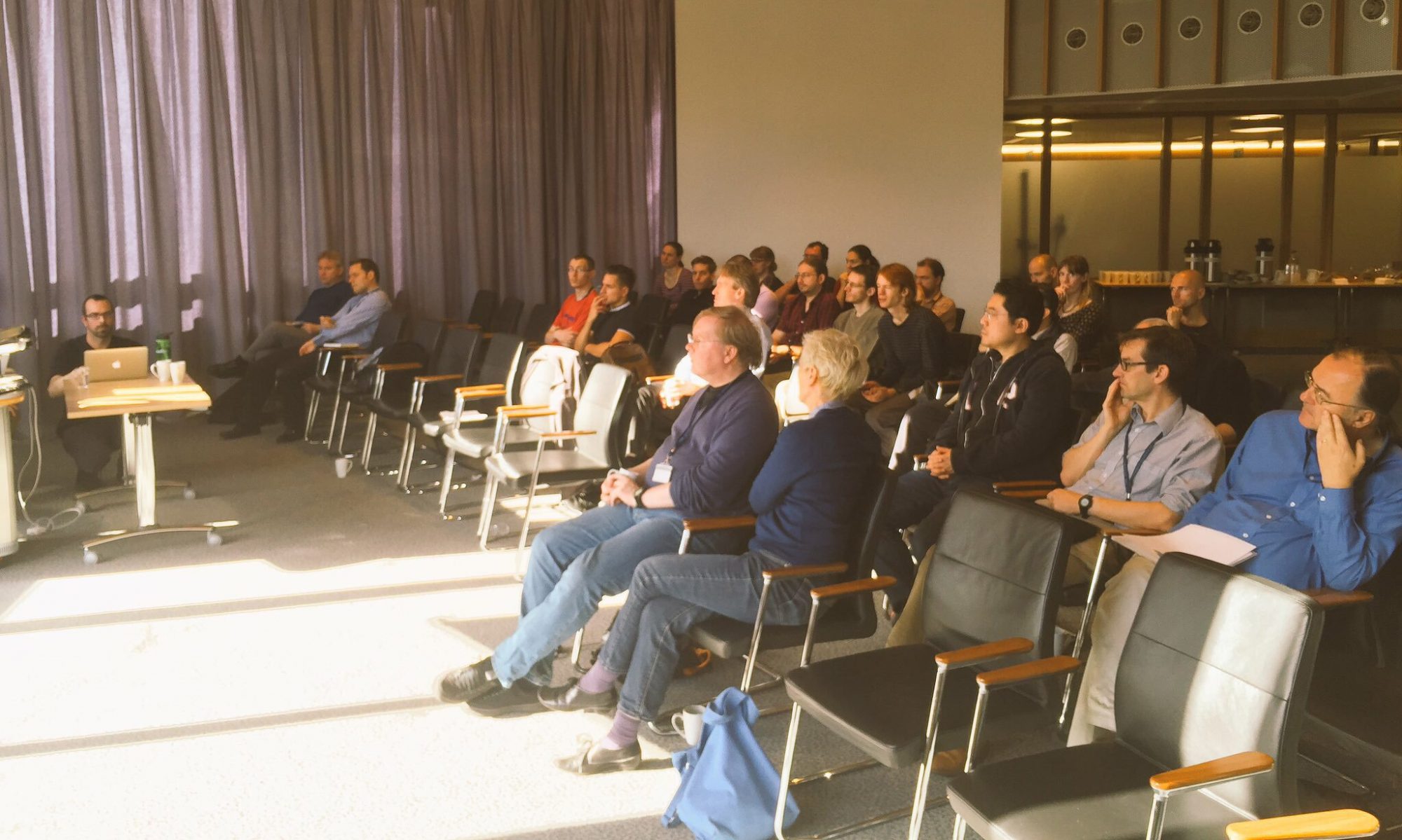
This week, a few members of IS have decamped to Amsterdam to attend DrupalCon 2014, which brings together people involved with all aspects of Drupal for a week of talks, labs, Birds-of-a-Feather sessions and many hours of coding on Drupal 8. The focus of Tuesday’s opening Prenote, a DrupalCon fixture beautifully compered by JAM and Robert Douglass, was life-changing Drupal experiences. Whether or not DrupalCon changes your life, the breadth and depth of sessions and associated discussions to be found here this week is undeniably absorbing. For those of us who are currently working on the University’s new central Drupal CMS, DrupalCon provides a unique opportunity to both validate the approach we are taking with our development processes, coding standards and infrastructure, and to discover new modules, best practices and techniques which will benefit our new Drupal CMS.

After Dries’ Keynote, the conference kicked off in earnest. We have crowdsourced some of the highlights of our first day of sessions below. Many thanks to Aileen, Arthur, Riky, Tim, Andrew, Adrian and Stratos, for contributing their thoughts on sessions they attended; any errors, omissions or misinterpretations in their edited summaries are entirely mine. The overriding impression from discussing the sessions we have all attended is that Drupal is often at the bleeding edge of development tools and technologies by virtue of the commercial and community pressures in the Open Source environment. Drupal’s presence as a tool in our development portfolio both challenges our own best practices and introduces new, innovative means of developing quality applications which anticipate the needs of an increasingly diversified technological world.

Most of the sessions mentioned below, along with many more interesting talks, are recorded and available on the DrupalCon website, so if the summaries pique your interest, visit the DrupalCon site for more information!

Development Processes, Deployment and Infrastructure

State of Drupal DevOps

Whilst the focus of this session was Drupal DevOps, Kris Buytaert’s talk applies more generally, covering the reasons why DevOps is not just a team or C.I. or Puppet. It is a cultural attitude that requires long-term thinking and a degree of co-operation from all teams. It’s not just about the lifetime of a particular project, but the lifetime of an application or service. The impact of putting off changes to deployment strategy is an increase in the “technical debt”; it only defers the issues, which then become support problems.

The proposed approach is mainly to expand best practices developed for writing code, such as version control and testing, down into the infrastructure and up into the monitoring tools. For example, the importance of repeatability is heavily emphasised; everything needs to versioned, and this includes infrastructure as well as artifacts. Using such DevOps techniques, we can better map and evaluate the impact of changes. The payoff should be safer, quicker sites or applications that do what people want, and developers get more feedback about why things went wrong (“It works on my machine.” is never an excuse).

Deploying your Sites with Drush

This session covered the Drush Deploy plugin, which allows you to create drush configuration files to describe each of your environments so you can deploy consistently to all servers with one command, reducing human error.

It was interesting to contrast the approach of this plugin vs Capistrano or services like Bamboo or Jenkins. We use drush heavily in the automated deployment process for the University’s new central Drupal CMS, but Bamboo still handles the code deployment to ensure consitency across environments. We use Ant scripts to describe the pre- and post- code deployment tasks for Bamboo to carry out, whereas these are specified in a drush configuration file for the Deploy plugin and are limited to drush functions. It was interesting to compare their approach to handling code rollbacks with our plans for this, even though they do not explicitly include resinstating the database as part of that process. However, we are in a different position as normally we would roll back immediately upon failed deployment rather than some hours/days later when content could have changed significantly.

The importance of adopting an appropriate Git workflow to support deployment where there is a branch for live deployment which is always deployable was also discussed. Having separate live and dev branches is very important, and making use of separate branches for hotfixes and features is recommended: http://nvie.com/posts/a-successful-git-branching-model/.

WF Tools – Continuous Delivery Framework for Drupal

WF Tools is a Continuous Delivery framework for Drupal sites, which was also shown off at DrupalCamp Scotland earlier this year. It is used to deploy code and configuration from git into a freshly spun-up Development virtual host environment. These code changes are all separate “jobs”, working from git branches; WF Tools allows you to tag these jobs with JIRA issues and trigger runs from a build tool such as Jenkins or Bamboo. After a successful run, the Development environment can be assigned to another user for peer review, and their GUI view shows a change log and git diffs for comments and approval or rejection. Any approved jobs continue along the Dev/Test/Staging/Live deployment pipeline.

WF Tools is an interesting solution which could wrap around our existing processes quite well, and the Pfizer implementation of the GUI looks good. However, as we’re already using a lot of Bamboo functionality, and we’re only developing one Drupal site centrally at the moment, it might not be perfect for our current requirements.

Understanding the Building Blocks of Performance

This talk by Josh Waihi covered ways in which a system could be created to fulfil a client’s needs using vertical and horizontal optimisation techniques, supplemented by profiling tools to help find and fix bottlenecks. ‘The building blocks of performance’ were broken down into different important categories, understand, build and optimise:

  • understanding the resource requirements before an application is built;
  • building the infrastructure in a suitable manner which balances complexity with performance;
  • using logging and load testing to optimise the performance of the Drupal system.

Vertical optimisation involves hosting the components in the system – load balancer, http cache, web server with PHP and Drupal, other files, database and database cache – on different servers. In addition, assigning more resources to a site makes for easier location of bottlenecks. Once the vertical optimisation is done then horizontal optimisation can begin. In general the web server is duplicated many times, all referring to the same database and shared files. The main limiting factor here is cost. And finally, load testing and profiling tools help to ensure your system is using the correct amount of resources.

Unlike other sessions where new, cutting edge techniques and technologies were discussed which could be used in the future for Drupal, this session was beneficial because it vindicated the techniques that we are already using:

  • scaling our infrastructure vertically before we scale it horizontally;
  • the importance of using business rather than technical metrics for our performance and capacity testing;
  • the different caching tiers we use to boost performance were aspects of our current practice validated by the expert from Acquia.

However, using PHP-FPM instead of mod_php and interesting diagnostic tools such as XHProf are interesting new ideas I’ll bring back to DevTech.

Front End Concerns

Panels, Display Suite, and Context – oh my! What to use when, why and how

Yes, it did open with a pic of Dorothy et al! This was a very well attended session covering when and why you should/could use the different layout options available for Drupal. With clever use of a ‘Garfield’ rating system it was clear that all have pros and cons depending on use and complexity of the site.

Here’s the “Janet and John” bit…

  • Context provides flexibility by extending core blocks to provide reusable blocks and regions, but Blocks are still hard to maintain and there is only one set of regions for layouts.
  • Panels is powerful with a high level of granularity and a default variant which provides a failover structure. However, the codebase for Panels is heavy and the functionality provided may be overkill for easy layouts.
  • Display Suite has a simpler UI and similar flexible layouts to Panels, but only Entity layouts are supported and because there is no structure across different layouts, things can easily become complicated.

The consensus seems to be that Display Suite ticks most boxes but each method has its merits. You may want to do some research to find the best for your particular project.

Drupal 8 breakpoints and responsive images

Although this session was titled for Drupal 8, both modules covered, picture and breakpoints, have been backported to Drupal 7 and we have recently implemented them to support the theme for the University’s new central Drupal CMS. At this point we only have four variants of the group banner image being served, one per breakpoint that has been defined in the theme.

The session also covered the module’s use of the sizes attribute to serve optimised versions of images according to the viewport width in steps between the breakpoints where required. This is not something we are currently implementing, but we will be in the coming weeks as we approach the initial distribution release of our new Drupal theme.

The State of the Front End

The Front End is moving forward faster than anything else in drupal. Display targets used to be 640 X 480 or 1024 X 760 for IE and Netscape using tables; easy! Now HTML5, CSS, JS, responsive design, etc. add significant complexity to Front End development, and these are not Drupal skills!

Frameworks come and go (e.g. 960 grid, blueprint, bootstrap) and we may catch up or even get ahead, but not for long when things change in the Front End so fast, and techniques fall in and out of fashion. However, Front End is A Thing, and is pushing Drupal forward in the post-responsive world. There are multiple frameworks for everything and too much scope to play design for design’s sake; the goal is truly device-independent design. It’s necessary to accept that you may be ahead, but only ever for a short time; however, there are many tools out there to support the drive to keep up with the rapidly changing world of Front End development.

Performance

Turbocharging Drupal syndication with Node.JS

Where you have to generate feeds from Drupal for high volume of requests, caching is sometimes not an option because requests from downstream clients include timestamps per second (to retrieve things that have changed since last request), or there are user filtered requests which aren’t likely to be repeated.

The approach taken here was to use an indexer module to generate de-normalised tables for the Drupal data on a MongoDB database, optimised for delivery, and put a fast Node.JS REST API in front. In their case-study, Drupal could be as slow as around 1 request per second where many records were being returned in one request, whereas NodeJS could handle 800-3000 requests per second. Response times dropped from up to a minute down to 80-150ms.

To support developing for many parallel/asynchronous requests in NodeJS, there are npm’s such as promises to help.

Getting content to a phone in less than 1000ms

In order for a site to respond quickly enough for a user not to get bored waiting and give up to go elsewhere, it’s generally accepted that pages should be served in under a second. This can be challenging enough in complex Drupal pages, but there are added constraints to consider with mobile devices on slow networks. The DNS lookup, TCP connection, TLS handshake and HTTP request over 3G can come to 800-1000ms alone before you get to the time Drupal takes to serve the content and then the time taken by the client to paint the page. Given that many countries primarily use mobile devices now to access the internet, this is becoming more important.

When painting the page there are some blockers that delay rendering of the content. In particular, moving JS to the footer whenever possible and using async and defer was recommended. The magic module can help achieve this, and any critical JS can be made inline.

CSS can also be split out into what’s required for mobile devices and then LoadCSS can be used to load the remainder without blocking the initial rendering of the page. However, it is not always practical to achieve this.

With TCP, most of the time taken is not due to limitations in bandwidth, but latency on each round trip with initiating each request (handshakes, etc). CDNs can help by putting content closer to the client and allowing more parallel connections (because they are split across different domains), but this is expensive and will likely be blocked in China. Aggregating files and spriting so there are fewer files to load, even inlining very small assets; all of these things can help. Remove things you don’t need. The target is to get first response within 10 packets, 14.6k (RFC 6928), although it’s extremely difficult and very few sites are able to achieve this.

Preparing for SPDY/HTTP2.0 can conflict with some of the HTTP1.1 optimizations above, such as domain sharding and concatenation. Some work has started on supporting SPDY features, such as server push, in Drupal.

Project Management and Engagement

Selling Agile

In this experimental session, the Vesa Palmu CEO of Wunderroot shared some of his lessons learned over the past 10 years using Agile on IT projects.

A core difficulty in getting agreement to use Agile can be the lack of trust between parties. The reasons for this mistrust can be a lack of understanding of what Agile actually means. How does using Agile translate for the business, in terms how this changes their activity during projects? Customers are unsure about the cost versus what will actually be delivered or are unwilling to engage by providing a product owner.

One of the key messages is that in order to sell Agile successfully, one needs to focus on selling the benefits of Agile. Some of the benefits:

  1. Collaborative development approach
  2. Testing development as it progresses
  3. Creating value faster the multiple deliveries
  4. Delivering better quality
  5. Making better decisions along the way

Mixing Agile and Waterfall should be avoided, the benefits of Agile cannot be realised when project teams are in two mind sets.

Equally not all projects sizes are suitable for Agile, as illustrated by the following slide:

AgileProjectSizes

The Myth of the Meerkat: Organising Self-Organising Teams

In this session, speaker Jason Coghlan examined whether the self-organising team is a reality, especially in a commercial or public sector Drupal services environment, focusing on tips for research rather than specific examples of how to coach and build self-organising teams.

The session covered the need to differentiate between control and accountability: the former must be relinquished; the latter, especially individual accountability, is extremely important. In the context of self-organising teams, “Leaders are required, managers are optional”. George will take care of it! The conclusion is that whilst self-organising teams are not suitable for all projects, they are an ideal approach to technology-driven projects where a clear product or solution is delivered, focusing on value and return.

Engaging UX and Design Contributors

This was a really interesting session from Design Researcher, Dani Nordin, highlighting the challenges of integrating User Testing, UX & Design guidelines in an already established community such as the Drupal community. It’s very obvious that it is difficult to engage developers and designers to cooperate in such an open environment, so one thing I took from this session is that there is a strong need for integrating UX into the process of module contribution. Even though it might sound restrictive (especially for people contributing in their own time) it will pave the way for a more user friendly and intuitive Drupal UX. Drupal 8 might be a good opportunity to explore this as well.

Looking to the Future

Drupal 8: The Crash Course

Having attended DrupalCon last year as a relative Drupal newbie, and with most of our current internal development focus on Drupal 7, I approached Larry Garfield’s technical Drupal 8 overview session with mild trepidation. I needn’t have worried. This well structured introduction to Drupal 8 and its use of Symfony2 was very accessible. The code samples were clear and progressively illustrated each concept to give a pretty good high level overview of what to expect from Drupal 8. Coming from a Java/C++/OO background, I can say that it truly seems “Drupal8 is finally not weird”. Lots of familiar code even in the context of an unfamiliar framework!

Twig and the new Drupal 8 Theme system

The current Drupal 7 theming system involves a mixture of markup generated by modules and the theme primarily through theming hooks (functions). This means the front-end developer does not have full control of the markup (and CSS) that’s output.

By converting all the hook functions to Twig templates in the new Classy theme for Drupal 8, the themers can be in full control of all the output. The hope is that this will make frontend developers engage with Drupal in the future and make it easier for web design companies to engage with Drupal.

Changing menus and pagers was demonstrated, two of the most complex components to theme since they are currently buried in module functions, but in Classy these elements are themed in single twig template files which can easily be re-written to change CSS dependencies and markup without needing to know the inner workings of the core pager and menu functions.
Creating a ‘Bootiful’ new Visitor Registration System

The time has come to replace the venerable Visitor Registration System that has served the University now for quite some time. In June the team established for the COM011 project, destined to fulfil this task, ran user workshops and collected some 480 ‘user stories’ from interested parties around the University who use the incumbent system. User Stories are the cornerstone of the Agile methodology which has been chosen for the project.

Using Agile will allow the team to adapt to changing requirements and produce an end product that reflects the will of the users. What better way to complement this than by also introducing a new light weight, flexible, development tool that encourages rapid development and prototyping into IS apps technology stack? Spring Boot, (or just ‘Boot’), which was released in April, is the culmination of an effort by the huge Java/Spring community to prove the speed and ease with which Java applications can be created. This technology was showcased, to massive excitement, when it was shown that Boot could deliver an entire running web application in a tweet.

Boot has been used as the basis of the new Visitor Registration project; we now have a framework in our code repository that can be reused by anyone who wants to quickly setup a fully functional web application, with responsive front end, security enabled for various user roles, Rest endpoints, Soap endpoints and backend Oracle integration. And all of this functionality is fully unit and integration tested – in keeping with the goal of Agile that software quality should always be paramount. The new Visitor Registration System, using cutting edge technologies, will hopefully stand the test of time as well as its predecessor.

Oracle SOA vs Spring – SOAP Web Service throughput testing

We are soon going to embark on a major project to introduce enterprise notification handling at the University. Part of that will be the ability to handle a large number of messages in an efficient and robust manner. We already use Oracle SOA Suite here at the University, but wanted to test its throughput versus a lighter approach, that of Java and the Spring framework.

The scenarios

We chose four scenarios to test:

  • Basic assign, parameter passed in is passed out as response
  • DB Write , parameter passed in is written to Oracle Database
  • DB Read, parameter passed in is used to read value from Oracle Database
  • DB Read/Write, parameter passed in is written to Oracle Database, then read back out again

Testing constraints

We then applied the same constraints to both Oracle SOA and Java:

  • A connection pool must be used with the same settings (min 1, max 10 connections)
  • The same table structure/setup must be used with both technologies
  • We use the same back-end Oracle database
  • Testing would be done using a SOAP UI load test

For Oracle SOA, we set up a simple composite which tested the various features.

For Java Spring, we used Spring Boot, Spring Web Services, and Spring JPA.

The results

The results were as follows (total timings are rounded up to the nearest second):

Oracle SOA

500 calls 2000 calls 5000 calls
Assign 2 sec | 293 ms avg 6 sec | 504 ms avg 16 sec | 593 ms avg
Write 3 sec | 1284 ms avg 10 sec | 861 ms avg 29 sec | 1094 ms avg
Read 2 sec | 389 ms avg 9 sec | 838 ms avg 21 sec | 803 ms avg
Write Read 3 sec | 1038 ms avg 18 sec | 1644 ms avg 36 sec | 1403 ms avg

Java (Spring framework)

500 calls 2000 calls 5000 calls
Assign 1 sec | 101 ms avg 1 sec | 82 ms avg 2 sec | 72 ms avg
Write 1 sec | 112 ms avg 2 sec | 232 ms avg 5 sec | 203 ms avg
Read 1 sec | 73 ms avg 1 sec | 116 ms avg 3 sec | 116 ms avg
Write Read 1 sec | 271 ms avg 3 sec | 256 ms avg 6 sec | 234 ms avg

Conclusions

It is clear that the Java Spring solution is giving better throughput times,, and that is especially evident when we increase the load. However it would be unfair to use throughput times alone in looking at what Oracle SOA provides. It gives for example an “out of the box” message resilience and  support for automated message retry that would have to be coded in when using Java even with the benefit of Spring frameworks. However, Spring can provide a very useful high throughput entry point into Oracle SOA.

We want to benefit from the strengths of each of the technologies, so we are going to use the following:

  • Java Spring Web Services will be used as the initial entry point for creating/editing/deleting notification messages
  • The Java Spring WS will put a message in a queue for Oracle SOA
  • Oracle SOA will poll the queue for messages, then will apply the necessary business processing and rule logic for pushing notifications out
  • Oracle SOA will handle message retry in the event of processing failures
  • Java Spring Web Services will be used for pulling user notifications out for subscriber systems

As with most of the modern web, building a solution is about choosing the right set of technologies and not choosing a single technology approach. We’re confident now that we can introduce the necessary scale to handle a modern enterprise notifications system.

Using Oracle Transportable Tablespaces to refresh Schemas/Tablespaces in Databases

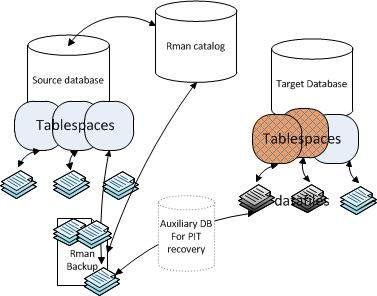
If there is a requirement to refresh large schemas/tablespaces within a  databases regularly it is worth considering using transportable tablespaces (TTS). This method is ideal for moving large data quickly thus minimising downtime. The time taken will depend on the size of the data files being moved and the amount of DDL contained, but generally speaking the operation will not take much longer than the time to move the data files. Interestingly TTS forms the basis for the new pluggable databases to be delivered in 12c, there is a “plugged_in” column in dba_tablespaces which will be set to “yes” after using TTS.

There are some limitations which can be found in the link below, but in the most cases we are able to use TTS.

http://docs.oracle.com/cd/B28359_01/server.111/b28310/tspaces013.htm#ADMIN11394

http://docs.oracle.com/cd/E11882_01/backup.112/e10642/rcmxplat.htm#BRADV05432

If we are refreshing using point in time data, where there is no requirement for  real time data, we would use RMAN backups to create our TTS sets. This means there is no effect on our source system i.e. no need to put the tablespaces into read only mode for the duration of the copy.

rman tts

TTS Example

I recently transported sits_data and sits_indx in STARDUST(target) from STARTEST(source) using an RMAN catalog and a recent backup of the source db. RMAN will handle the creation of an auxiliary database for you to facilitate the point in time recovery of the desired tablespaces.


Assumptions:

  • You are already using an RMAN catalog to backup the source system.
  • The target system already exists.
  • There is adeququite space for another copy of the data files.
  • The Tablespaces do not exist on the target system( i.e. dropped or renamed)
  • TTS_IMP directory is pointing to /u22/oradata/STARDUST
  • tablespaces have already been checked using
    exec dbms_tts.TRANSPORT_SET_CHECK(‘tablespace(s)

Execution:

        1. login to source oracle server as oracle.
        2. source the environment file for STARTEST – orastartest
        3. connect to rman –  rman target=/ catalog=recman/xxx@rmantest
        4. issue:
          RMAN> transport tablespace sits_data,sits_indx
          TABLESPACE DESTINATION ‘/u22/oradata/STARDUST’
          auxiliary destination ‘/b01/backup/TTS’
          until time ‘sysdate-2/24’;
          This will create a dump file and import script which will be used to import the ddl into the target db.
        5. source the environment file for STARDUST – orastardust
        6. copy import line from import script in /u22/oradata/STARDUST
        7. e.g. impdp / directory=TTS_DIR dumpfile= ‘dmpfile.dmp’ transport_datafiles= /u22/oradata/STARDUST/sits_data01.dbf, /u22/oradata/STARDUST/sits_data02.dbf, /u22/oradata/STARDUST/sits_data03.dbf, /u22/oradata/STARDUST/sits_data04.dbf,/u22/oradata/STARDUST/sits_data05.dbf, /u22/oradata/STARDUST/sits_data06.dbf, /u22/oradata/STARDUST/sits_data07.dbf, /u22/oradata/STARDUST/sits_data08.dbf, /u22/oradata/STARDUST/sits_data09.dbf, /u22/oradata/STARDUST/sits_data10.dbf, /u22/oradata/STARDUST/sits_data11.dbf, /u22/oradata/STARDUST/sits_data12.dbf, /u22/oradata/STARDUST/sits_indx01.dbf, /u22/oradata/STARDUST/sits_indx02.dbf, /u22/oradata/STARDUST/sits_indx04.dbf, /u22/oradata/STARDUST/sits_indx05.dbf, /u22/oradata/STARDUST/sits_indx06.dbf, /u22/oradata/STARDUST/sits_indx03.dbf
        8. The tablespacess are now available in STARDUST.
        9. alter tablespace sits_data read write;
        10. alter tablespace sits_indx read write;


Overlapping projects: two sides of the same coin

Over the past few months in IS SSP we have been working on two major SITS projects: UG Paperless and Direct Paperless Admissions. Both projects have come out of the push towards moving away from paper applications and doing all of our admissions processing online. The UG Admissions project was first implemented last year and is now in its second iteration. Direct Admissions will be released for the first time this fall. Continue reading “Overlapping projects: two sides of the same coin”

An ERASMUS study visit

We have said goodbye to our visitor from the University of Trento, Mauro Ferrari.  Mauro is a web application developer and used the EU’s ERASMUS scheme to fund a two-week study visit to learn how we develop software and in particular how we implement the University’s portal, MyEd.

Mauro’s highlights were:

  • Learning about MyEd, particularly Martin Morrey’s EDUCAUSE talk on analytics
  • Talking about our project methods, especially agile projects
  • Seeing how we use development tools such as JIRA and Bamboo
  • Learning about the Drupal Features module for managing changes in Drupal modules

Mauro also complimented us on our attention to the experience of users and our commitment to migrate data across versions.  He was interested to learn about SAP BI Suite and could see how it would help his University but thought that this would be beyond his team’s current capabilities.

Mauro was more critical of some aspects of the user experience in MyEd.  One example he gave was the way that the whole page redraws when a user changes something in the Event Booking portlet.  He also thought the list of available portlets was hard to scroll.  He gave demos of the Trento portal to several of us; there may be lessons that we can learn from their work.

I was interested to learn of Trento’s approach to managing identities with multiple roles.  Each of their systems prompts you to choose your role when you log in, so you have a single identity and can select which role to use if more than one applies.  Their portal allows you to group all your portlets regardless of role.  This would be a big change for us and I am not suggesting that we change tack, just noting that it was interesting to see the different approach.

Mauro also demonstrated their system for creating and managing applications, which covers everything from Doctoral positions to summer school places to public lectures to internal events and more.  Basically it is a sophisticated form editor with a back-end that lets organisers check applications and so forth.  It clearly works for Trento; for us I think the question it raises is whether a central service of this sort would be useful.  Such a service would combine Events Booking, (use of) EventBrite for public events, OLLBook for evening courses, and possibly more.  I don’t see this as a priority but again it was interesting to compare the approaches.

My overall lesson from his visit is that we are a very effective and mature organisation with much to teach other universities.  Which is not to say that we know everything or that we cannot learn from other universities in return.

I would like to thank everyone who gave their time to talk to Mauro for helping to create a successful visit for our guest. I also thank Mauro for choosing us for his study; we were very pleased to be his hosts.

Resilient File Infrastructure

Resilient file infrastructure

In the last 2-3 years a number of key services have been advanced, upgraded and replaced. With these changes have come some architectural alterations that have strained our ability to guarantee data integrity in the event of a disaster. This has come about due to design choices by vendors primarily on how they retain objects in their applications. For example in some of the services vendors choose now to retain both transactional database information and real objects that are referred to in the database in associated external file systems. This might take the form of a Word document or a PDF for example where the application holds metadata in the transactional database and the real file in an external file system.
Databases are now typically synchronised in real time across two datacentres at King’s Buildings and Appleton Tower and it follows that it is now very important that the objects held in the external file systems are replicated in a similar manner to ensure that in the event of a disaster both transactional database information and the associated external file system objects can be recovered to the same point in time with no data loss.
Most recently attempts were made to address this problem and within the tel013 and uwp006 projects a resilient file system that could replicate content from King’s Buildings to Appleton Tower was prepared and evaluated. However during evaluation a number of technical constraints emerged that proved that this solution would not be viable.

The requirement for the resilient file system still exists and so we propose to do the following;

• Gather a complete set of the applications and their priority that should make use of this resilient file system service
• Evaluate the technical demands that these applications will impose on a resilient file system and prepare a set of technical requirements
• Catalogue a set of potential solutions that might be used to satisfy these requirements
• Evaluate these potential solutions against the technical requirements
• Identify the preferred solution and prepare a recommendation on which solution to implement

The information gathering and evaluation will be carried out by staff in both ITI and Applications Division

Iain Fiddes

Bursary Management first releases

A new development was implemented in July 2014 to enable processing of Access Bursary applications within EUCLID.

Access Bursaries are one type of a number of centrally and locally administered bursaries and scholarships available from the University of Edinburgh.  Access Bursaries are centrally administered by the Student Administration department.

The internal user base is very small, and the main business user worked closely with the project team to produce a tailored solution.

The project was implemented mid-cycle and therefore started in the middle of the process.  All applications for 2014/5 had already been received, reviewed and scored in the legacy system.  Data was exported from the legacy system to create fund bid records in EUCLID.

Bursary staff have a suite of screens allowing them to:

  • View basic application data and imported references
  • Make initial decision (award, reject  or place on waiting list)
  • Allocate the applicant to a specific bursary fund
  • Release bursary transactions to Finance for payment (due September 2014)

A further release is scheduled for October 2014, to include an online Application Form, Reference request and upload, and staff application processing with full application data.

Jon Martin and Morag Iannetta

Online Registration Phase 2 implemented

Online Registration was implemented late 2013, enabling all students registering on programmes starting on or after 01 January 2014 to register online.  The process allows students to confirm personal details, submit queries regarding information held, and to register for, or decline places on, programmes.  If the student requires Immigration clearance, they are only partially registered via the online registration process: Immigration Compliance staff at the University will then check appropriate documentation and complete the registration for the student.

In the Summer of 2014 the Online Registration functionality was enhanced ahead of the registration period for the main annual cohort of students:

  • Additional protected characteristics questions have been added to the registration process to satisfy HESA requirements
  • When registered/partially registered, students are able to view, update and upload documentation for passports and visas via student self-service for Immigration Compliance
  • Immigration Compliance functionality has been enhanced to allow users to mark documentation as checked, to request further documentation, and allows the user to complete the registration process for international students from ‘Immigration Overview’ screens in addition to ‘Validate International Documentation’ screens.

Jon Martin and Morag Iannetta

MyEd Updates 2014/5

One of the major projects over summer 2014 has been the update to MyEd. Behind the scenes we’ve moved from uPortal 3 to 4, although for most users the clearest changes are the excellent work done by Learning Teaching & Web on the new theme. The migration itself has taken months of effort, with many portlets (applications running within MyEd) essentially requiring to be completely rewritten for the new version. The configuration of the two systems are not directly compatible, and tools had to be developed to update and maintain configurations for over 100 channels (the small sectons seen by the user, such as “Learn” or “Staff Details”) across three different environments (development, test and live), testing each of these changes both in isolation and integrated into the complete system.

Many of these channels also depend on other applications (such as accommodation, event booking, Learn, etc.) which in some cases needed to be modified and those modifications tested. Extensive load testing was performed to ensure the systems would handle the very high load anticipated for any major university service at the start of term. Hopefully this helps to give an idea of the scale of the project.

So what next for MyEd? Mobile support was disabled in the current deployment, but a  project is currently underway to add support for mobile devices for a number of core parts of MyEd. I’m sure many will be pleased to know this is expected to include both campus maps and timetabling, with email, calendar, Learn and a number of other tools available at launch. Naturally both iPhone and Android platforms will be supported, with full details to follow.